Ethernet and LAN are terms that are often used interchangeably, yet they refer to two distinct concepts. LAN stands for Local Area Network — a local network characterized by its limited size, making it suitable for environments such as homes, offices, and similar settings. As a network grows in size, it transitions from a LAN to a MAN (Metropolitan Area Network) or a WAN (Wide Area Network). So what does Ethernet mean? Ethernet is a standardized technology that enables communication between the various elements of a LAN and/or with an external network.
Ethernet technology can be used for LAN, MAN, and WAN networks, but this does not mean that a LAN must necessarily be an Ethernet network — even though in most cases it is. Why?
First, Ethernet technology emerged very early and spread widely in a short time, meaning that newer technologies such as FDDI and ATM found the field already occupied. Second, compared to competing technologies, Ethernet is more affordable and easier to use, and the widespread availability of hardware components has further facilitated its adoption. Third, Ethernet works reliably and is subject to few problems. Finally, Ethernet is well suited for use with TCP/IP.
Did you know? Ethernet technology was developed in the late 1970s by Xerox and standardized in 1983. Its protocol is based on an earlier protocol used in the Hawaiian Islands to connect computers distributed across the islands via radio. This radio network, which shared data in packets, was known as Aloha. The first LAN, on the other hand, was developed by Olivetti at the European Parliament in 1980 to enable the connection of terminals used by Members of the European Parliament for voting.
Despite the widespread adoption of wireless technology for home use — which simplifies network setup in the initial phase — Ethernet (wired) connections offer advantages that Wi-Fi simply cannot match:
- Greater speed, reliability, and security compared to Wi-Fi
- Consistent speed
- No data encryption required
- Lower latency
Important note: Cavel “LAN” cables are compatible with Ethernet technology. Therefore, there is nothing incorrect about referring to them as, for example, a Cat 6 Ethernet cable.
Table of Contents
- Ethernet cable categories
- Which Ethernet cable to choose
- Ethernet cable for fiber
- Outdoor Ethernet cable
- Flexible Ethernet cable
Ethernet cable categories
The defining parameter of Ethernet cables is the operating frequency, or bandwidth: the higher the frequency, the greater the amount of data that can be transmitted and, consequently, the better the performance in terms of speed. Furthermore, for the same amount of data transmitted, a higher frequency allows data to be sent over longer distances. Another factor to consider when choosing an Ethernet cable is cable shielding — particularly relevant in industrial environments or in the context of the 5G mobile standard, which increases the risk of interference even in wired transmission.
Ethernet cable categories are divided into:
Below you will find the technical data sheet with detailed specifications — speed, bandwidth, maximum distance, and shielding — for each category.
Cat. 5e Ethernet cable — specifications
The Cat 5e Ethernet cable surpasses the earlier standards introduced by Cat 3 and Cat 5, offering speeds of up to 100 Mbit/sec and improved interference reduction. This is achieved through higher production quality and the adoption of more stringent technical specifications. In particular, Cat 5e effectively reduces “crosstalk” — interference between adjacent cable pairs — making it ideal for current LAN networks, where it delivers superior performance at a competitive cost.
| Frequency / Bandwidth | up to 100 MHz |
| Maximum speed | up to 1 Gbps |
| Maximum length | 100 m (CHANNEL) |
| Shielding | 5e U/UTP (no shielding) · 5e F/UTP (overall aluminium foil shield) · 5e SF/UTP (overall aluminium foil + braid shield) |
| Application | Home use, Smart TV, Streaming, Gaming |
Product page:
Cat. 6 Ethernet cable — specifications
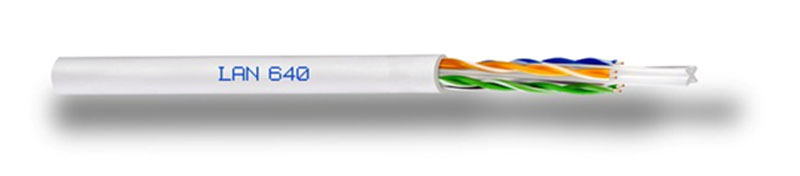
Category 6 Ethernet cables support frequencies up to 250 MHz, making them suitable for network protocols up to 1000BASE-T/1000BASE-TX (Gigabit Ethernet) at speeds of 1 Gbit/sec.
| Frequency / Bandwidth | up to 250 MHz |
| Maximum speed | 1 Gbit/sec |
| Maximum length | 100 m (CHANNEL) |
| Shielding | 6 U/UTP (no shielding) · 6 F/UTP (overall aluminium foil shield) |
| Application | Home use, Smart TV, Streaming, Gaming |
Cat. 6A Ethernet cable — specifications
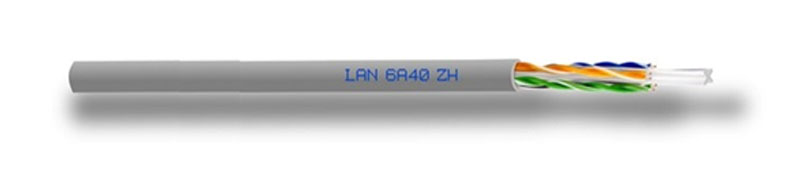
The “A” in Augmented refers to the enhanced performance compared to CAT6. Cat. 6A cables support frequencies up to 500 MHz, making them suitable for network protocols up to 10GBASE-T (10 Gigabit Ethernet) at speeds of 10 Gbit/sec. They offer greater bandwidth and higher data transmission speeds than standard CAT6 cables, making them an ideal choice for large enterprise networks and applications such as large file transfers, high-definition video surveillance, and unified communications. In short, choosing Cat. 6A cables can lead to greater network efficiency and performance, ensuring reliable and fast connectivity for business-critical applications.
| Frequency / Bandwidth | up to 500 MHz |
| Maximum speed | 10 Gbit/sec |
| Maximum length | 100 m (CHANNEL) |
| Shielding | 6A U/UTP (no shielding) · 6A F/FTP (overall shield and individual pair shielding with aluminium foil) |
| Application | Business use |
Product page:
Cat. 7 Ethernet cable — specifications
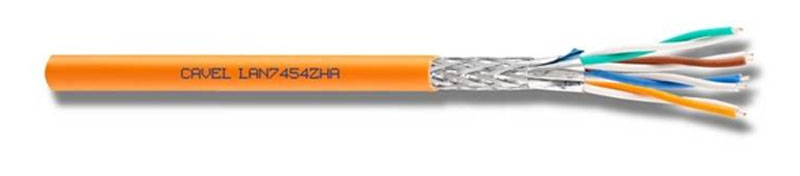
Cat 7 Ethernet cables offer significant improvements in performance and reliability compared to their predecessors. One of their main advantages is the ability to support higher bandwidths, making them ideal for data-intensive applications such as video streaming and online gaming. They also feature improved shielding, which helps reduce interference and improve signal quality — particularly important in environments with high levels of electrical noise, such as industrial facilities or data centers.
One of the main challenges with Cat 7 cables is their size and rigidity: they are significantly thicker and less flexible than previous generations, which can make them more difficult to install in certain situations.
| Frequency / Bandwidth | up to 600 MHz |
| Maximum speed | 10 Gigabit Ethernet |
| Maximum length | 100 m (CHANNEL) |
| Shielding | S/FTP (overall braid shield, individual pairs shielded with aluminium foil) |
| Application | Business use |
Product page:
Introduction to enhanced Cat. 7A cables
The Class FA channel and Cat. 7A cable have been designed to support transmissions up to 1000 MHz over 10 Gigabit Ethernet networks for runs of up to 100 metres. Cat 7A cable is suitable for a wide range of applications, including 40 Gigabit Ethernet transmission up to 50 metres, 100 Gigabit Ethernet up to 15 metres, and CATV (passband up to 862 MHz).
The Cavel Cat 7A cable range includes three models: LAN7A1000 (frequency up to 1000 MHz), LAN7A1200 (frequency up to 1200 MHz), and LAN7A1500 (frequency up to 1500 MHz).
Product page:
Cat. 7A1000 Ethernet cable — specifications
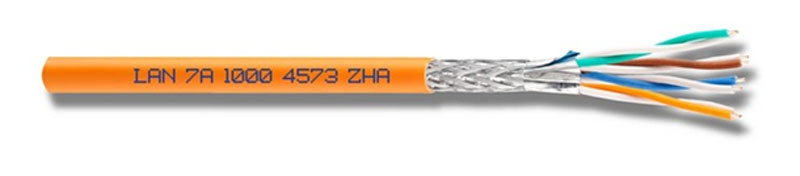
| Frequency / Bandwidth | up to 1000 MHz |
| Maximum speed | up to 10 Gbit/sec |
| Maximum length | 100 m (CHANNEL) |
| Shielding | S/FTP |
| Application | Data centers and network infrastructures |
Cat. 7A1200 Ethernet cable — specifications
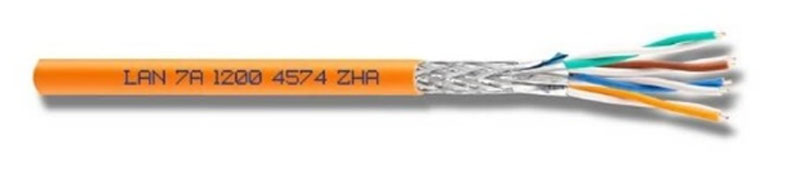
| Frequency / Bandwidth | up to 1200 MHz |
| Maximum speed | up to 25 Gbit/sec |
| Maximum length | 30 m (CHANNEL) |
| Shielding | S/FTP |
| Application | Data centers and network infrastructures |
Cat. 7A1500 Ethernet cable — specifications
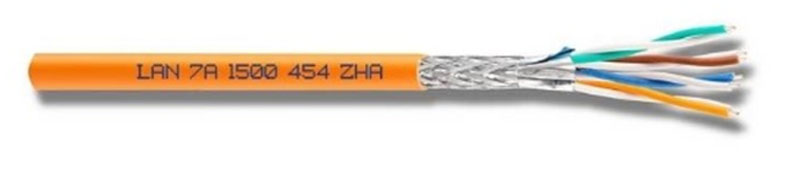
| Frequency / Bandwidth | up to 1500 MHz |
| Maximum speed | up to 40 Gbit/sec |
| Maximum length | 30 m (CHANNEL) |
| Shielding | S/FTP |
| Application | Data centers and network infrastructures |
Cat. 8 Ethernet cable — specifications
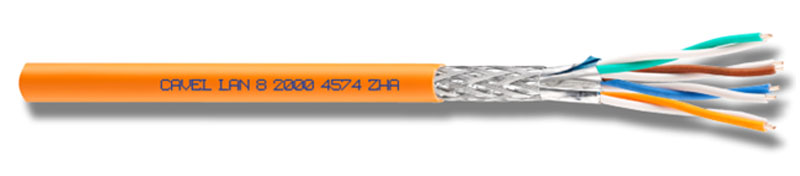
Cat 8 Ethernet cables are designed to support frequencies up to 2000 MHz — twice the frequency of Cat 6A cables. This enables faster data transfer rates, with speeds of up to 40 Gbps over distances of up to 30 metres. They feature thicker gauge wires and more robust shielding, which helps reduce interference and improve signal quality — making them an ideal choice for high-bandwidth applications such as data centers, gaming systems, and streaming devices.
It is important to note that Cat 8 Ethernet cables are not yet a widely adopted standard, and not all network devices and components are compatible with them. It is therefore essential to consult a network infrastructure specialist before making the switch.
| Frequency / Bandwidth | up to 2000 MHz |
| Maximum speed | 40 Gigabit Ethernet |
| Maximum length | 100 m (CHANNEL) |
| Application | Data centers and network infrastructures |
Is there a Cat. 9 cable? We occasionally receive enquiries about a supposed CAT9 cable. At present, however, there are no development plans for an Ethernet cable category supporting frequencies above 2000 MHz or speeds beyond 40 Gigabit. Current operator performance is approaching 2.5 Gigabit, with a medium-term outlook of 10 Gigabit/sec.
Which Ethernet cable to choose
Ethernet cable shielding guide
| Code | Description |
|---|---|
| U/UTP | Unshielded cable, no overall or individual pair shielding |
| F/UTP | Overall shielding only, with a foil wrapping the 4 twisted pairs |
| U/FTP | Individual pair shielding only, no overall shield |
| F/FTP | Overall foil shield plus individual pair foil shielding |
| S/FTP | Overall braid shield plus individual pair foil shielding |
Frequently Asked Questions
When should shielded network cables be used?
Shielded network cables (twisted pair shielded, or S/TP) are recommended in applications where it is necessary to protect transmitted signals from electromagnetic interference (EMI). They are particularly useful in environments with a high density of electronic devices, such as industrial settings or in proximity to sensitive electronic equipment. In such situations, S/TP cables help prevent signal degradation, ensuring greater system reliability and performance. However, it is important to carefully evaluate specific requirements, as the use of shielded cables may involve additional costs and greater installation complexity.
What is the purpose of cable shielding?
All LAN cables sold by Cavel are manufactured at our facility in Gropello Cairoli (PV), on the outskirts of Milan, in accordance with ISO 9001:2015 quality standards, and are guaranteed for 15 years from the date of purchase.
Ethernet Cable for Fiber
Given the well-known performance levels of fiber optic connections, the Ethernet cable that carries data from the external fiber line into our homes must be able to support an adequate speed — otherwise it risks becoming a bottleneck that limits the overall performance of the fiber connection.
Which Ethernet cable to choose for Fiber?
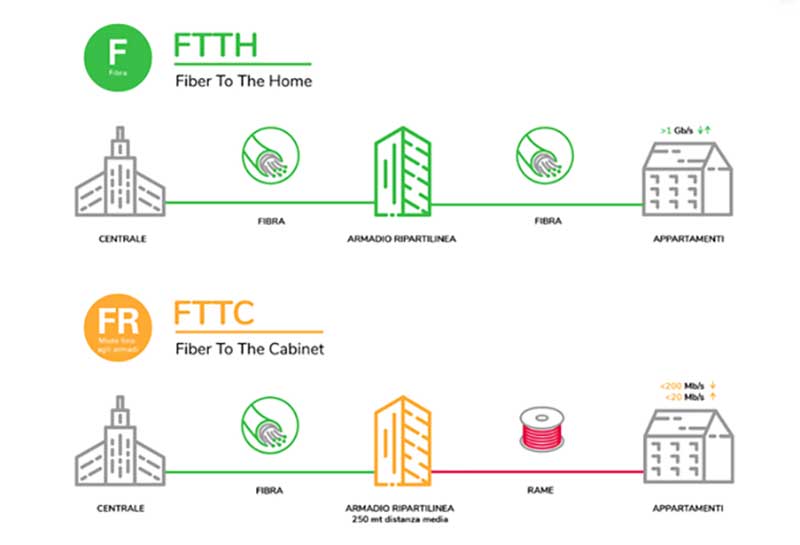
Currently, operators offer two types of fiber connection depending on their network architecture. The first, FTTC (Fiber to the Cabinet), brings the fiber to the street cabinet, from which the final stretch to homes and offices is covered by copper cables. This is the most widely available solution, as it is less costly, but it offers reduced performance that depends on external factors such as the distance from the cabinet and temperature. Download speeds typically reach around 200 Mbit/sec.
The second option is FTTH (Fiber to the Home), which uses fiber optic cables for the entire connection, including the final stretch, enabling superior performance with average download speeds of 1 Gbit/sec. To further improve performance, specific technologies are required beyond the street cabinet, such as GPON (nominal speed of 2.5 Gigabit) and XGS-PON (the “S” stands for “Symmetric”, meaning equal upload and download speeds, up to 10 Gigabit). The 25GPON technology (up to 25 Gigabit) is currently under development.
Conclusions
- To exceed 200–300 Mbit/sec and reach 1 Gigabit, an FTTH system is required — not yet fully widespread
- To exceed 1 Gigabit (up to 2.5 Gigabit), FTTC must be combined with GPON
- FTTC + XGS-PON enables speeds of up to 10 Gbit/sec both for download and upload (still a niche technology)
- 25GPON is currently under development and will eventually enable speeds of up to 25 Gigabit/sec
The choice of Ethernet cable for a LAN network is influenced by technological developments and by the connectivity options available in the geographic area where the installation will take place. In general, a CAT6 Ethernet cable is sufficient for most current use cases. However, for a future-proof LAN network, it is advisable to opt for a CAT6A or CAT7 Ethernet cable — their higher operating frequencies also help reduce interference.
Further information on fiber optic cables
Outdoor Ethernet Cable
It is important to pay attention to the type of material used for the cable jacket, which in outdoor installations should be made of UV-resistant PVC.
In general, if the cable is to be buried, it is strongly advised not to bury it directly in the ground. A dedicated protective conduit must be used to ensure adequate protection and longevity.
Flexible Ethernet cable
When it comes to Ethernet cables, there is a choice between solid and flexible cables. Flexible cables, thanks to their stranded copper conductors, are required in specific situations such as:
- Repeated bending
- Presence of vibrations that stress the solid conductor
- Mobile installation conditions where a floating layout is required
The cable series known as LANF refers precisely to this type of flexible cable.
When connecting horizontal cabling terminals to network connectivity devices such as switches and hubs via patch panels, factory-assembled and tested patch cords are the recommended choice. These patch cords also establish the connections between wall outlets and network devices such as computers, printers, and other Ethernet devices. Patch cords are the part of the network cabling that is directly visible and handled. However, due to their exposure, they are often the weak point of the system: bending, tearing, crushing, and worn contacts can drastically reduce performance.
Although it is technically possible to build a patch cord using the same cables used for the main cabling, this practice is strongly discouraged. It is preferable to use patch cords of the same transmission category as the main cables. If a patch cord is to be made using main cabling cables, it is important to choose plugs suitable for the cable termination, carefully checking the diameters of the inner conductors and insulation to ensure compatibility between cable and connector.
The assembly of patch cords requires precision and accuracy to ensure consistent and reliable data transmission performance. The termination process, which involves untwisting the pairs, increases the cable’s susceptibility to interference. Improper mechanical bending when attaching the connector to the cable can alter the cable’s normal geometry and become a source of interference or attenuation. Factory-assembled and tested patch cords are therefore essential components for ensuring consistent and reliable transmission performance.
It is also always advisable to follow the guidelines on minimum bend radius and maximum tensile force. Cable bundles should be grouped loosely using cable ties, so they can rotate freely when repositioned on patch panels. Tangled cables must be avoided at all times.
You can find further information on our flexible Ethernet cables on our dedicated page.
All LAN cables sold by Cavel are manufactured at our facility in Gropello Cairoli (PV), on the outskirts of Milan, in accordance with ISO 9001:2015 quality standards, and are guaranteed for 15 years from the date of purchase.
